AI/Run CodeMie Components Deployment
Overview
This section describes the process of the main AI/Run CodeMie components deployment to the AKS cluster.
For infrastructure deployment details, refer to the Infrastructure Deployment section
Prerequisites
- Make sure you have obtained kubeconfig for AKS from previous section.
- AKS cluster should have installed:
- Nginx Ingress Controller
- Azure Storage Class
If your AKS cluster does not already have an Nginx Ingress Controller and a Storage Class configured, don't worry. This guide and automated script includes detailed instructions for setting up both of these essential components in the appropriate sections that follow.
- Clone codemie-helm-charts repository
- Set up pull secrets for container registry access. For detailed instructions, see Container Registry Access.
AI/Run CodeMie Application Stack Overview
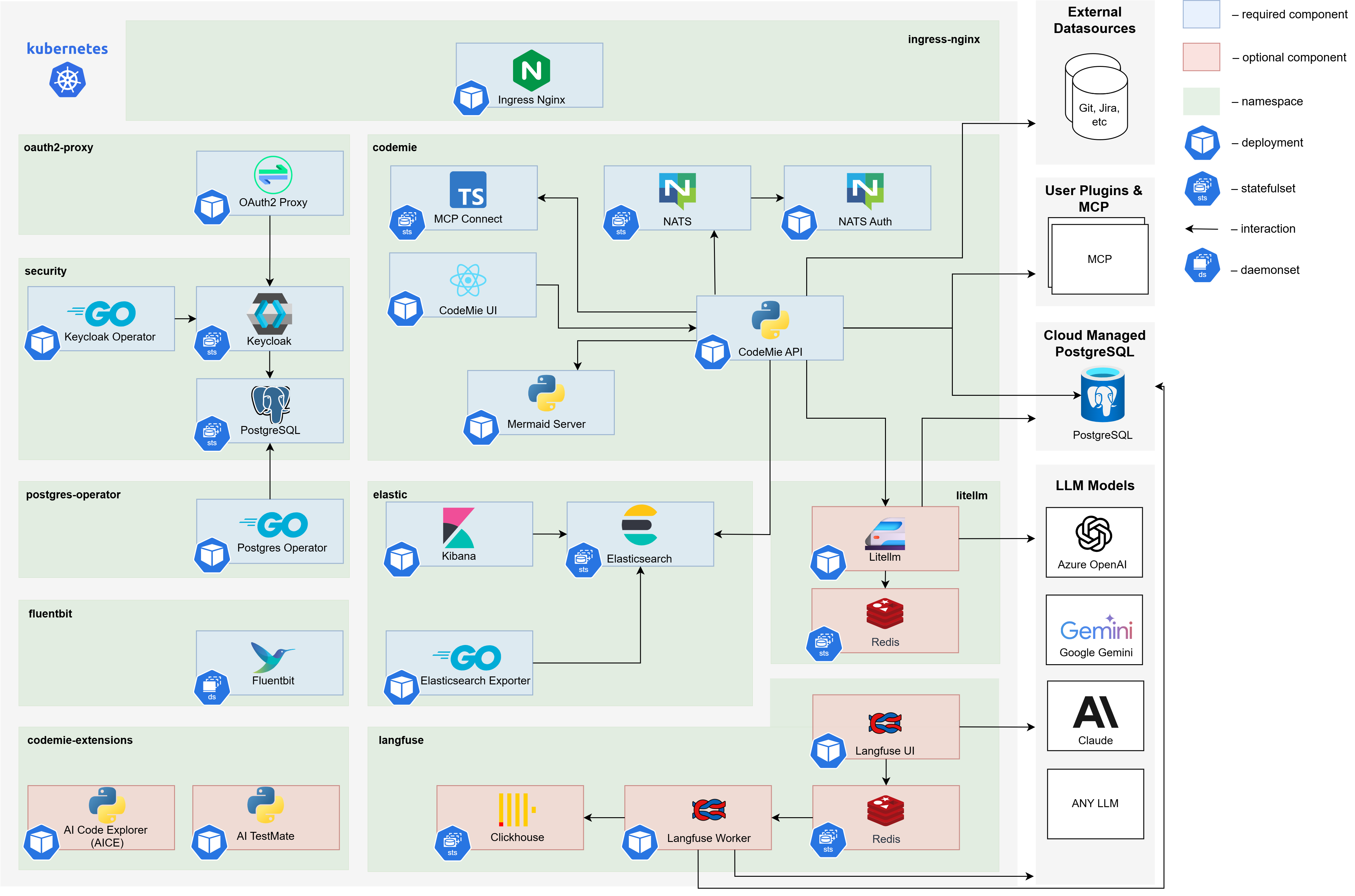
Core AI/Run CodeMie Components
AI/Run CodeMie latest releases for core components versions can be found by executing following script in the codemie-helm-charts repository for each component.
bash get-codemie-latest-release-version.sh
bash get-codemie-latest-release-version.sh -c ./path/to/key.json
Make sure you logged in with key.json shared with you.
Versions for Docker containers and Helm releases are matching
| Component name | Images | Description |
|---|---|---|
| AI/Run CodeMie API | europe-west3-docker.pkg.dev/or2-msq-epmd-edp-anthos-t1iylu/prod/codemie:x.y.z | The backend service of the AI/Run CodeMie application responsible for business logic, data processing, and API operations |
| AI/Run CodeMie UI | europe-west3-docker.pkg.dev/or2-msq-epmd-edp-anthos-t1iylu/prod/codemie-ui:x.y.z | The frontend service of the AI/Run CodeMie application that provides the user interface for interacting with the system |
| AI/Run CodeMie Nats Auth Callout | europe-west3-docker.pkg.dev/or2-msq-epmd-edp-anthos-t1iylu/prod/codemie-nats-auth-callout:x.y.z | Authorization component of AI/Run CodeMie Plugin Engine that handles authentication and authorization for the NATS messaging system |
| AI/Run CodeMie MCP Connect | europe-west3-docker.pkg.dev/or2-msq-epmd-edp-anthos-t1iylu/prod/codemie-mcp-connect-service:x.y.z | A lightweight bridge tool that enables cloud-based AI services to communicate with local Model Context Protocol (MCP) servers via protocol translation while maintaining security and flexibility |
| AI/Run Mermaid Server | europe-west3-docker.pkg.dev/or2-msq-epmd-edp-anthos-t1iylu/prod/mermaid-server:x.y.z | Implementation of open-source service that generates image URLs for diagrams based on the provided Mermaid code for workflow visualization |
Required Third-Party Components
| Component name | Images | Description |
|---|---|---|
| Ingress Nginx Controller | registry.k8s.io/ingress-nginx/controller:x.y.z | Handles external traffic routing to services within the Kubernetes cluster. The AI/Run CodeMie application uses oauth2-proxy, which relies on the Ingress Nginx Controller for proper routing and access control |
| Storage Class | – | Provides persistent storage capabilities |
| Elasticsearch | docker.elastic.co/elasticsearch/elasticsearch:x.y.z | Database component that stores all AI/Run CodeMie data, including datasources, projects, and other application information |
| Kibana | docker.elastic.co/kibana/kibana:x.y.z | Web-based analytics and visualization platform that provides visualization of the data stored in Elasticsearch. Allows monitoring and analyzing AI/Run CodeMie data |
| Postgres-operator | registry.developers.crunchydata.com/crunchydata/postgres-operator:x.y.z | Manages PostgreSQL database instances required by other components in the stack. Handles database lifecycle operations |
| Keycloak-operator | epamedp/keycloak-operator:x.y.z | Manages Keycloak identity and access management instance and it's configuration |
| Keycloak | docker.io/busybox:x.y.z, quay.io/keycloak/keycloak:x.y.z, registry.developers.crunchydata.com/crunchydata/crunchy-postgres:x.y.z | Identity and access management solution that provides authentication and authorization capabilities for integration with oauth2-proxy component |
| Oauth2-Proxy | quay.io/oauth2-proxy/oauth2-proxy:x.y.z | Authentication middleware that provides secure authentication for the AI/Run CodeMie application by integrating with Keycloak or any other IdP |
| NATS | nats:x.y.z, natsio/nats-server-config-reloader:x.y.z | Message broker that serves as a crucial component of the AI/Run CodeMie Plugin Engine, facilitating communication between services |
| LLM Proxy or EPAM DIAL Proxy | docker.io/epam/ai-dial-core:x.y.z, docker.io/epam/ai-dial-adapter-openai:x.y.z, docker.io/bitnami/redis-cluster:x.y.z | Optional proxy component that balances requests to Azure OpenAI language models (LLMs), providing high availability and load distribution |
| Fluent Bit | cr.fluentbit.io/fluent/fluent-bit:x.y.z | Fluent Bit enables logs and metrics collection from AI/Run CodeMie enabling the Agents observability |
Deployment Methods
Choose your preferred deployment method:
- Scripted Deployment - Automated deployment using helm-charts.sh script
- Manual Deployment - Step-by-step manual installation of each component
Finalizing Installation and Accessing Applications
Regardless of your installation method, eventually you should have the following application stack available:
| Component | URL |
|---|---|
| AI/Run CodeMie UI | http://codemie.private.lab.com |
| AI/Run CodeMie API | http://codemie.private.lab.com/code-assistant-api/v1 |
| Keycloak UI | http://codemie.private.lab.com/keycloak/admin |
| Kibana | http://codemie.private.lab.com/kibana |
Some components maybe missing due to your setup configuration or use http protocol in private cluster.
For detailed manual installation steps for each component, please refer to the codemie-helm-charts repository documentation.
Next Steps
After successful components deployment, proceed to Post-Installation Configuration to complete required setup steps.