AI Code Explorer (AICE)
AI Code Explorer (AICE) is an intelligent code analysis and exploration platform that provides advanced code understanding capabilities through graph-based knowledge representation and AI-powered insights.
AICE System Requirements
The diagram below depicts the AICE Platform deployed on Kubernetes infrastructure within a cloud environment.
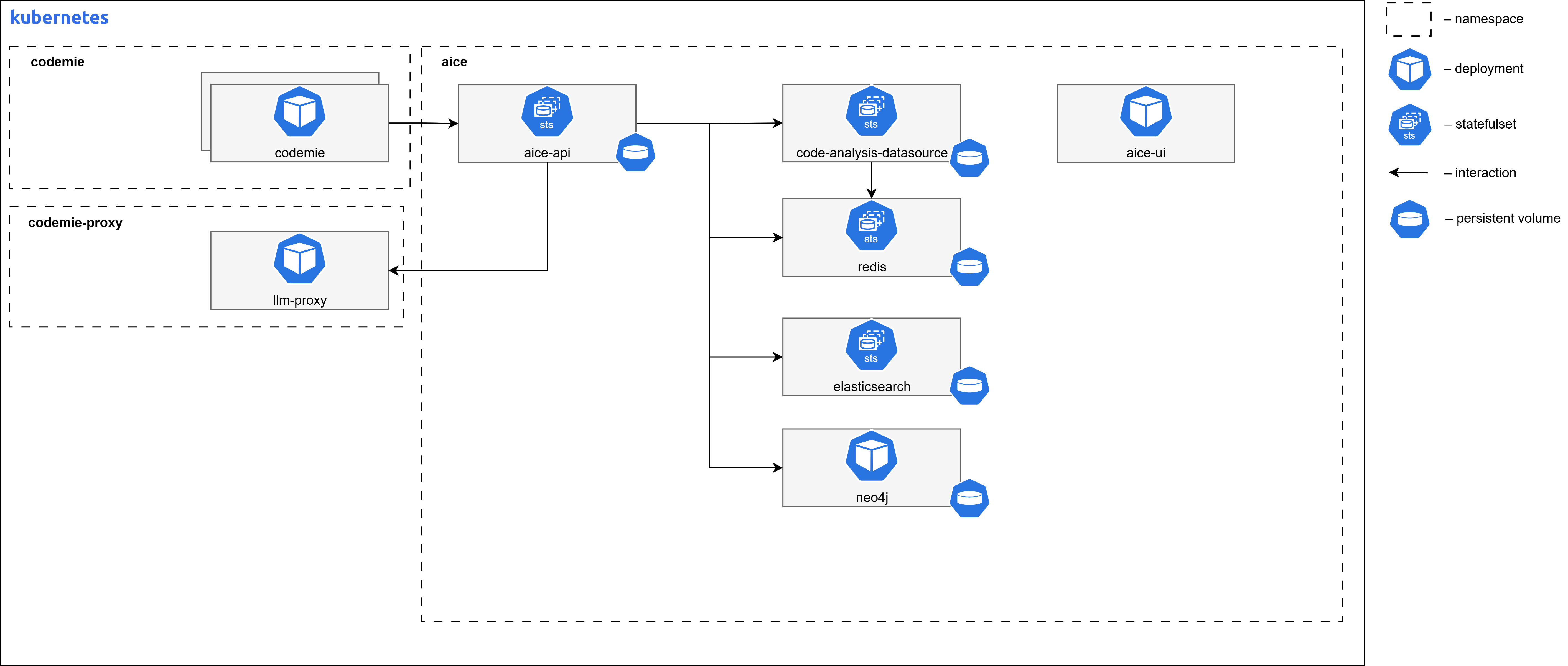
AICE Container Resource Requirements
| Component Name | Replicas | Memory | CPU (cores) |
|---|---|---|---|
| code-exploration-ui | 1 | 256Mi | 0.1 |
| code-analysis-datasource | 1 | 4Gi | 2.0 |
| code-exploration-api | 1 | 4Gi | 2.0 |
| code-exploration-api-worker | 1 | 4Gi | 2.0 |
| neo4j | 1 | 16Gi | 2.0 |
| elasticsearch | 1 | 8Gi | 2.0 |
| elasticvue | 1 | 512Mi | 0.2 |
| redis | 1 | 1Gi | 0.5 |
Core AICE Components Overview
| Component name | Images | Description |
|---|---|---|
| code-exploration-ui | aice/code-exploration-ui:latest | Frontend UI application for code exploration, built with React and served via Nginx. Provides the web interface for users to interact with the AICE system. |
| code-analysis-datasource | aice/code-analysis-datasource:latest | Service responsible for parsing and analyzing source code. Exposes APIs for code analysis and provides data to the main API service. Uses LSP implementations and ANTLR for code parsing and semantic analysis. |
| code-exploration-api | aice/code-exploration-api:latest | Main backend API service that handles requests from the UI. Manages the code knowledge graph, interacts with Neo4j, Elasticsearch, and LLM providers to deliver code exploration capabilities. Implements hexagonal architecture for maintainability and scalability. |
| code-exploration-api-worker | aice/code-exploration-api:latest | Background worker process for the API service that handles asynchronous tasks such as LLM processing. Uses the same image as the API service but runs with a different command. |
Third-Party AICE Components
| Component name | Images | Description |
|---|---|---|
| neo4j | neo4j:5.26.3 | Graph database used to store and query the code knowledge graph. Configured with APOC and Graph Data Science plugins for advanced graph operations. |
| elasticsearch | docker.elastic.co/elasticsearch/elasticsearch:8.16.1 | Search engine used for full-text searching of code and related metadata. Provides powerful search capabilities across the codebase. |
| redis | redis:8.2.2 | In-memory data store used for caching, session management, and as a message broker for the task queue system. Facilitates communication between API and worker processes. |
PostgreSQL Configuration
Configure your PostgreSQL instance with the necessary database and user.
Configuring PostgreSQL running in managed cloud
-
Navigate to the SQL section in Managed Cloud
-
Connect to PostgreSQL database
codemiedepending on your cloud provider:- Some cloud providers have built-in query tools
- Deploy pgadmin inside cluster to access your private Postgres instance:
# Create namespace and secret
kubectl create ns pgadmin

kubectl create secret generic pgadmin4-credentials \
--namespace pgadmin \
--from-literal=password="$(openssl rand -hex 16)" \
--type=Opaque

helm upgrade --install pgadmin pgadmin/. -n pgadmin --values pgadmin/values.yaml --wait --timeout 900s --dependency-update

# port-forward to svc
kubectl -n pgadmin port-forward svc/pgadmin-pgadmin4 8080:80

# access via localhost:8080 with secret from pgadmin namespace, user - "pgadmin4@example.com" -
Open the SQL Editor tab
-
Execute the following SQL commands:
CREATE DATABASE postgres_aice;
CREATE USER aice WITH PASSWORD 'your_strong_password_here';
GRANT ALL PRIVILEGES ON DATABASE postgres_aice TO aice; -
Switch to the
postgres_aicedatabase -
Grant schema privileges:
GRANT ALL ON SCHEMA public TO aice;
Step 1: Deploy AICE
Install or upgrade AICE using Helm:
helm upgrade --install aice ./aice \
--namespace aice \
--values ./aice/values-<cloud_name>.yaml
Step 2: Configure Neo4j
Configure Neo4j with required plugins for graph data science and APOC functionality:
kubectl cp neo4j-graph-data-science-2.13.4.jar aice-neo4j-0:/plugins/neo4j-graph-data-science-2.13.4.jar -c neo4j -n aice
kubectl cp apoc-5.26.3-core.jar aice-neo4j-0:/plugins/apoc-5.26.3-core.jar -c neo4j -n aice
kubectl cp dozerdb-plugin-5.26.3.0.jar aice-neo4j-0:/plugins/dozerdb-plugin-5.26.3.0.jar -c neo4j -n aice

kubectl rollout restart statefulset aice-neo4j -n aice
Next Steps
- Return to Extensions Overview
- Configure other extensions