AI/Run CodeMie Components Deployment
Overview
This section describes the process of the main AI/Run CodeMie components deployment to the GCP GKE cluster. Before proceeding, make sure you obtained kubectl credentials using one of the following commands from terraform output depending on your cluster access type:
# Use the command from Terraform outputs
# Parameters: "get_kubectl_credentials_for_public_cluster" or "get_kubectl_credentials_for_private_cluster"
For infrastructure deployment details, refer to the Infrastructure Deployment section.
Prerequisites
- Obtain kubeconfig for created cluster.
- Make sure Kubernetes cluster has installed:
- Nginx Ingress Controller
- Storage class
If your Kubernetes cluster does not already have an Nginx Ingress Controller and a Storage Class configured, don't worry. This guide includes detailed instructions for setting up both of these essential components in the appropriate sections that follow.
-
Clone codemie-helm-charts repository
-
Before deploying AI/Run CodeMie components, you need to properly set up pull secret:
Ask AI/Run CodeMie team to provide key.json file and email of a service account to pull images from our container registry. Create codemie namespace:
kubectl create namespace codemie
Configure the secret in your cluster. Replace %%PROJECT_NAME%% with your project name:
kubectl create secret docker-registry gcp-artifact-registry \
  --docker-server=https://europe-west3-docker.pkg.dev \
  --docker-email=gsa-%%PROJECT_NAME%%-to-gcr@or2-msq-epmd-edp-anthos-t1iylu.iam.gserviceaccount.com \
  --docker-username=_json_key \
  --docker-password="$(cat key.json)" \
  -n codemie
Reference the secret in codemie-ui, codemie-api, codemie-nats-auth-callout, codemie-mcp-connect-service and mermaid-server deployments:
imagePullSecrets:
  - name: gcp-artifact-registry
AI/Run CodeMie Application Stack Overview
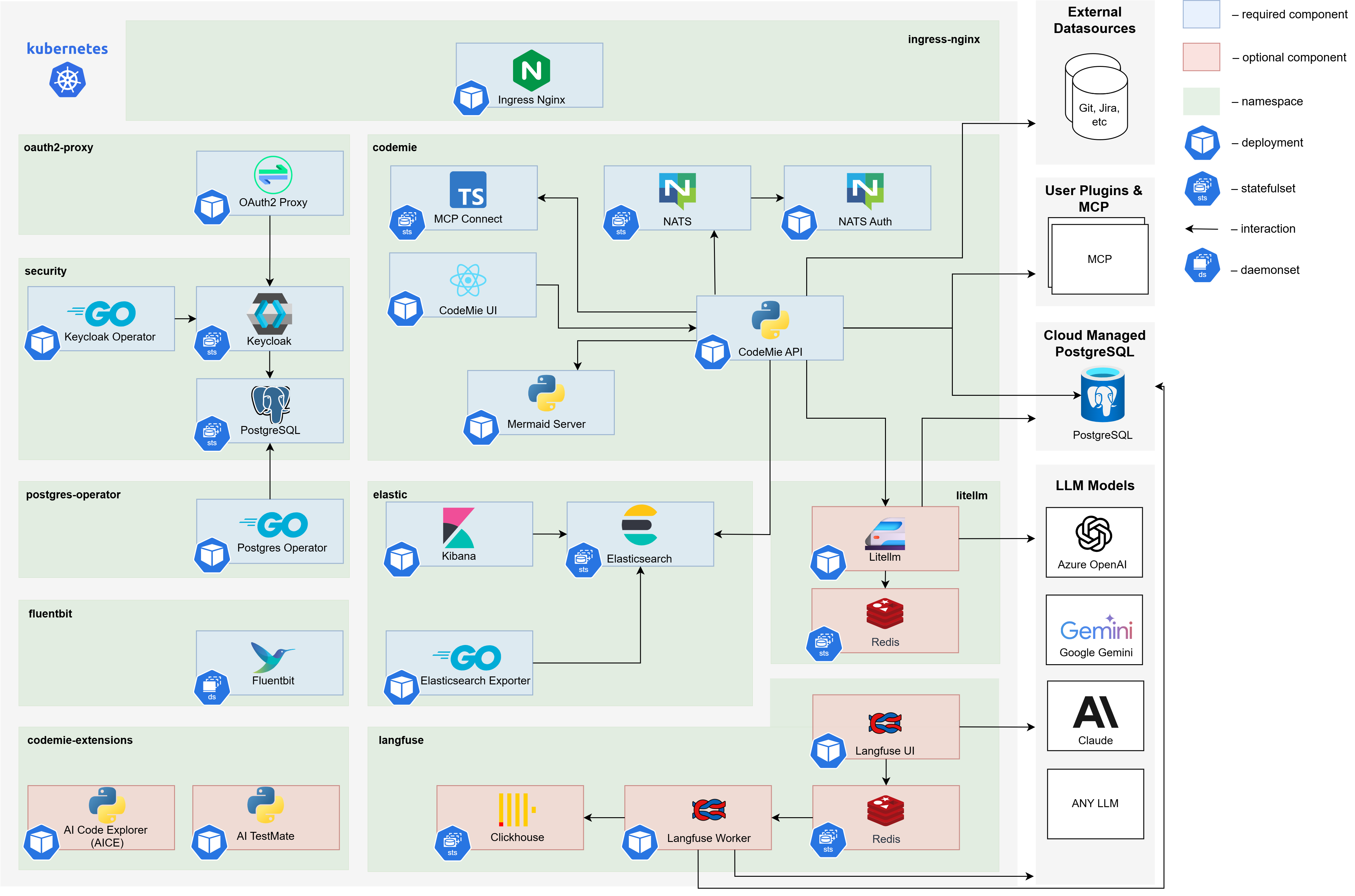
Core AI/Run CodeMie Components
AI/Run CodeMie latest releases for core components versions can be found by executing the following script in the codemie-helm-charts repository for each component.
bash get-codemie-latest-release-version.sh
bash get-codemie-latest-release-version.sh -c ./path/to/key.json
Make sure you logged in with key.json shared with you.
Versions for Docker containers and Helm releases are matching.
:::
| Component name | Images | Description |
|---|---|---|
| AI/Run CodeMie API | europe-west3-docker.pkg.dev/or2-msq-epmd-edp-anthos-t1iylu/prod/codemie:x.y.z | The backend service of the AI/Run CodeMie application responsible for business logic, data processing, and API operations |
| AI/Run CodeMie UI | europe-west3-docker.pkg.dev/or2-msq-epmd-edp-anthos-t1iylu/prod/codemie-ui:x.y.z | The frontend service of the AI/Run CodeMie application that provides the user interface for interacting with the system |
| AI/Run CodeMie Nats Auth Callout | europe-west3-docker.pkg.dev/or2-msq-epmd-edp-anthos-t1iylu/prod/codemie-nats-auth-callout:x.y.z | Authorization component of AI/Run CodeMie Plugin Engine that handles authentication and authorization for the NATS messaging system |
| AI/Run CodeMie MCP Connect | europe-west3-docker.pkg.dev/or2-msq-epmd-edp-anthos-t1iylu/prod/codemie-mcp-connect-service:x.y.z | A lightweight bridge tool that enables cloud-based AI services to communicate with local Model Context Protocol (MCP) servers via protocol translation while maintaining security and flexibility |
| AI/Run Mermaid Server | europe-west3-docker.pkg.dev/or2-msq-epmd-edp-anthos-t1iylu/prod/mermaid-server:x.y.z | Implementation of open-source service that generates image URLs for diagrams based on the provided Mermaid code for workflow visualization |
Required Third-Party Components
| Component name | Images | Description |
|---|---|---|
| Ingress Nginx Controller | registry.k8s.io/ingress-nginx/controller:x.y.z | Handles external traffic routing to services within the Kubernetes cluster. The AI/Run CodeMie application uses oauth2-proxy, which relies on the Ingress Nginx Controller for proper routing and access control |
| Storage Class | – | Provides persistent storage capabilities |
| Elasticsearch | docker.elastic.co/elasticsearch/elasticsearch:x.y.z | Database component that stores all AI/Run CodeMie data, including datasources, projects, and other application information |
| Kibana | docker.elastic.co/kibana/kibana:x.y.z | Web-based analytics and visualization platform that provides visualization of the data stored in Elasticsearch. Allows monitoring and analyzing AI/Run CodeMie data |
| Postgres-operator | registry.developers.crunchydata.com/crunchydata/postgres-operator:x.y.z | Manages PostgreSQL database instances required by other components in the stack. Handles database lifecycle operations |
| Keycloak-operator | epamedp/keycloak-operator:x.y.z | Manages Keycloak identity and access management instance and its configuration |
| Keycloak | docker.io/busybox:x.y.z, quay.io/keycloak/keycloak:x.y.z, registry.developers.crunchydata.com/crunchydata/crunchy-postgres:x.y.z | Identity and access management solution that provides authentication and authorization capabilities for integration with oauth2-proxy component |
| Oauth2-Proxy | quay.io/oauth2-proxy/oauth2-proxy:x.y.z | Authentication middleware that provides secure authentication for the AI/Run CodeMie application by integrating with Keycloak or any other IdP |
| NATS | nats:x.y.z, natsio/nats-server-config-reloader:x.y.z | Message broker that serves as a crucial component of the AI/Run CodeMie Plugin Engine, facilitating communication between services |
| LLM Proxy | – | Optional proxy component that balances requests to Azure OpenAI language models (LLMs), providing high availability and load distribution |
| Fluentbit | cr.fluentbit.io/fluent/fluent-bit:x.y.z | Fluentbit enables logs and metrics collection from AI/Run CodeMie enabling the Agents observability |
Deployment Methods
Choose your preferred deployment method:
- Scripted Deployment - Automated deployment using helm-charts.sh script
- Manual Deployment - Step-by-step manual installation of each component
Finalizing Installation
Regardless of your installation method, eventually you should have the following application stack available:
| Component | URL |
|---|---|
| AI/Run CodeMie UI | https://codemie.<your-domain> |
| AI/Run CodeMie API | https://codemie.<your-domain>/code-assistant-api/v1 |
| Keycloak UI | https://keycloak.<your-domain>/auth/admin |
| Kibana | https://kibana.<your-domain> |
Some components may be missing due to your setup configuration or use http protocol in private cluster.
Next Steps
After successful components deployment, proceed to Post-Installation Configuration to complete required setup steps.