LLM Model Name in Workflow
Use browser Developer Tools to identify the LLM model being used in your workflow execution.
Steps to Find Model Name
-
Open AI/Run CodeMie in your browser.
-
Open Developer Tools:
- Press F12, or
- Right-click on the page and select Inspect
-
Navigate to Network Tab:
The Network tab displays all HTTP requests made by the application.
-
Refresh the Page:
Press F5 to capture network activity, including LLM model requests.
-
Locate the LLM Models Request:
Search or filter for
llm_modelsin the Name column: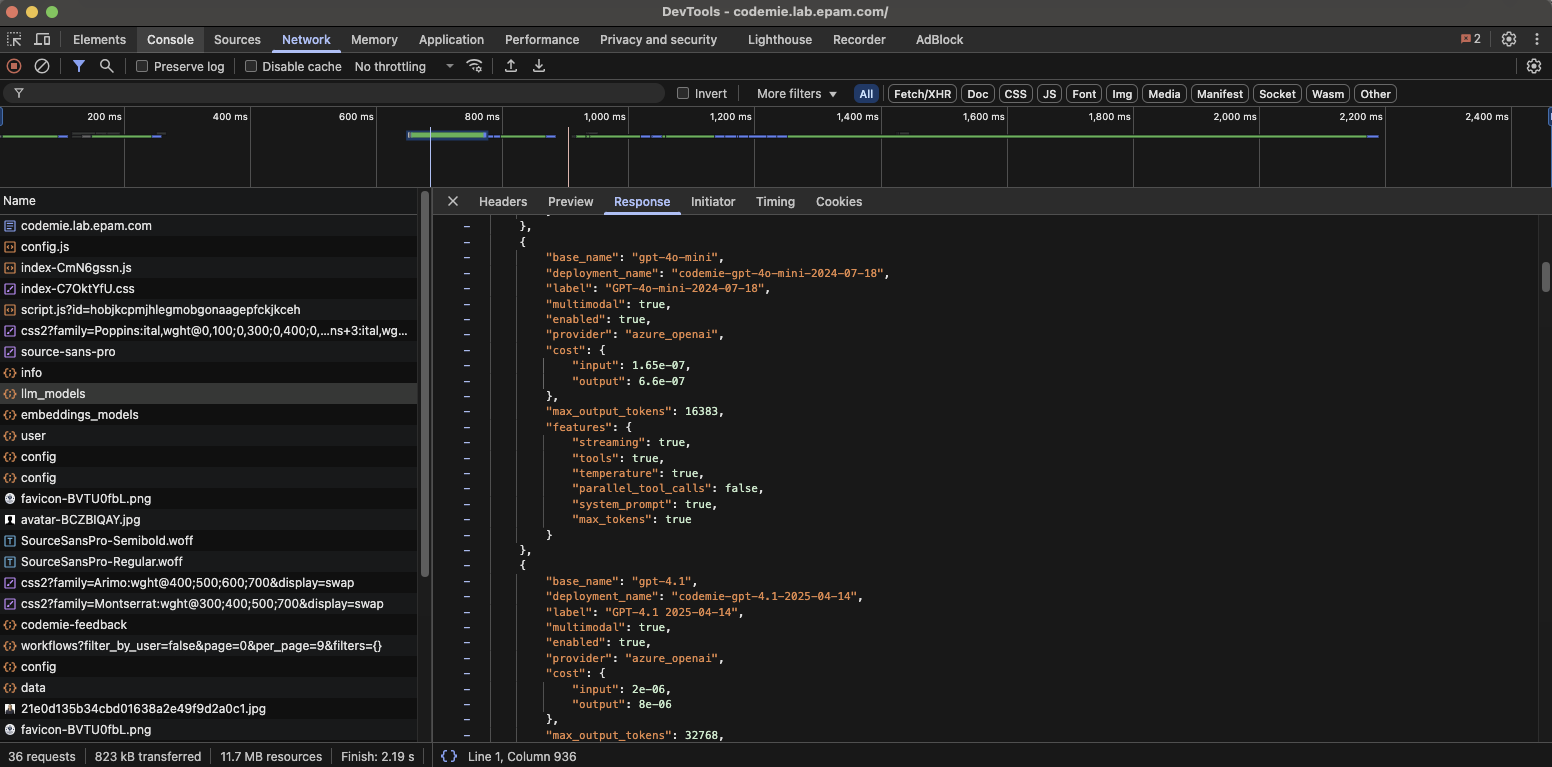
-
View Response Data:
Click on the request, then select the Response tab to see the JSON response.
-
Find the Model Name:
Locate the
base_namefield in the JSON response - this indicates the LLM model name used in the workflow.
Example Response Structure
{
  "model_id": "...",
  "base_name": "gpt-4o",
  "provider": "..."
}
The base_name field contains the model identifier (e.g., gpt-4o, claude-3-sonnet, etc.).