Supported File Formats
Upload and analyze various file types in assistant conversations. AI/Run CodeMie supports multiple formats for different use cases.
Supported Formats
| Format | Extension | Use Case |
|---|---|---|
| Images | .jpeg, .jpg, .png, .gif | Visual analysis, screenshots, diagrams |
| Documents | .pdf, .pptx | Documentation, presentations, reports |
| Data | .csv | Tabular data, spreadsheets, data analysis |
File Size Limit: Maximum 100MB per file
Working with Files
Upload files directly in the chat interface:
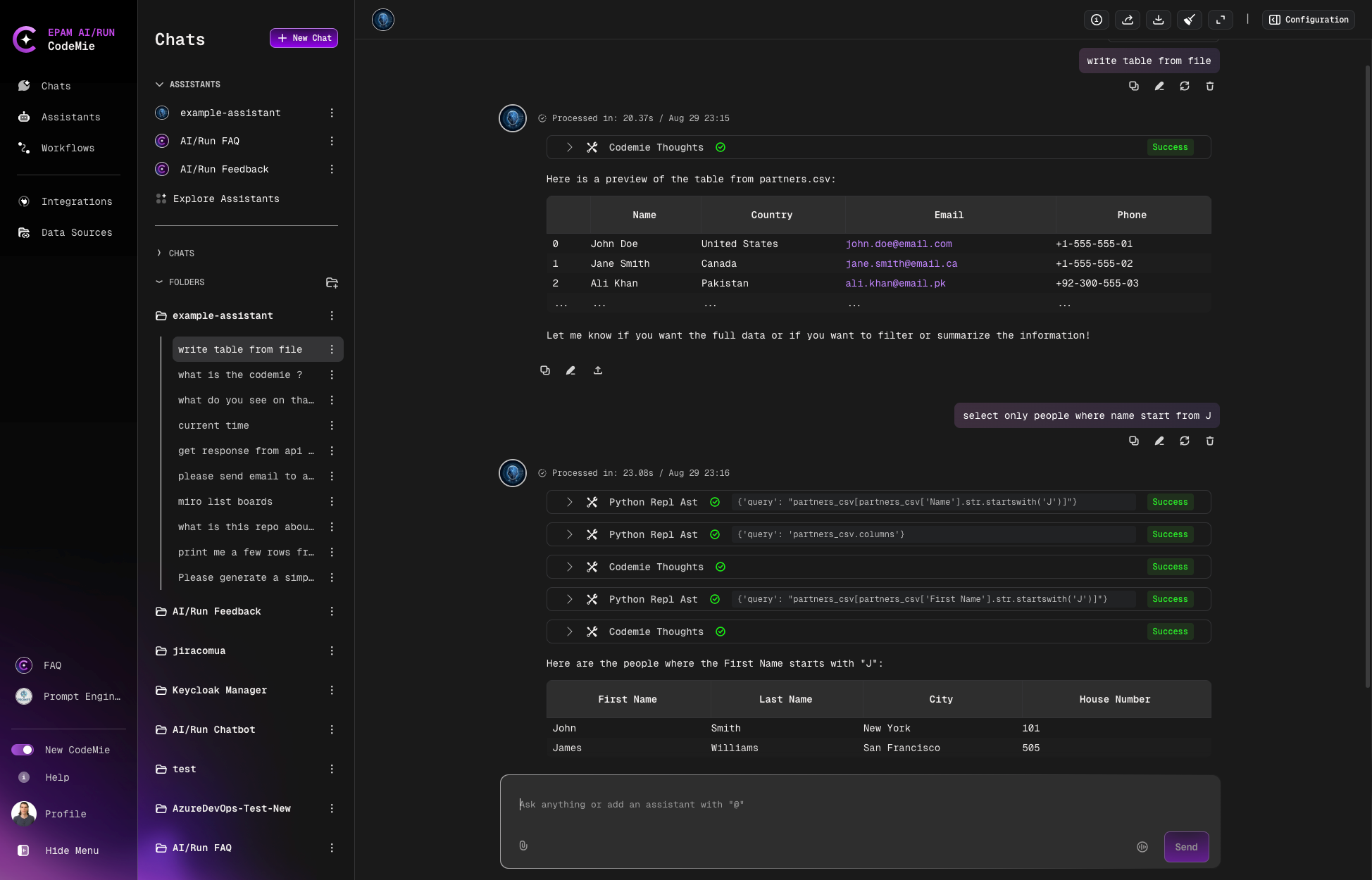
CSV File Handling
Assistants can analyze CSV files and perform data operations:
- Display information in specific formats
- Filter data based on criteria
- Extract specific columns or rows
- Summarize data insights
- Generate visualizations from data
File References
Once uploaded, files remain accessible throughout the chat conversation. You can reference previously uploaded files in subsequent messages without re-uploading.
Data Analysis
When uploading CSV files, provide context about the data structure and your analysis goals to get more accurate results from the assistant.
Persistence
Uploaded files are linked to the specific chat conversation. They will not be available in other chats unless re-uploaded.